
Why Consistency is Key in External Processes (And How to Achieve It)

Why Consistency is Key in External Processes (And How to Achieve It)

Why Consistency is Key in External Processes (And How to Achieve It)

When external processes are inconsistent—messy handovers, vague requests, duplication of effort – everyone feels the pain. Vendors, stakeholders, solicitors: they each want something clear, timely, and accurate. Meanwhile, your team is stuck chasing missing details, patching up errors, and firefighting confusion that never needed to exist in the first place. It shouldn’t be this hard to get things right, every single time.

Inconsistent external processes create a level of avoidable chaos that undermines efficiency and reliability. When external interactions are haphazard and unclear, everyone suffers, from your team trying to process requests to those depending on accurate and timely responses.

But there’s good news. Streamlining external processes into consistent, repeatable workflows doesn’t have to be hard. Here’s how, and why, it’s worth your effort.

Why consistency matters in external processes

When external requests arrive in different formats, with varied details or missing essential information, it turns a straightforward task into a time-consuming hunt. Standardising what you require – right down to formatting and must-have fields makes a world of difference.

Every request should look and read the same, every time, no matter who sends it in.

Quick Tip:

Use online forms with mandatory fields to ensure complete submissions every time.

1. Reduces guesswork and rework

With a set format for external submissions, there’s no need to decode ambiguous requests or waste time chasing up for missing attachments and details.

A clear standard means you always get the property address where it should be, the right contact information, and all supporting documents in a consistent order.

Why it matters

Missing details in external requests lead to delays and errors. Establish a checklist for external parties to use before submitting requests.

2. Cuts down on mistakes

When every request includes the same required information, the chance of overlooking something crucial drops dramatically. No more missed fields hidden in email chains or vital instructions buried in paragraph three.

Standardised requests help you spot gaps instantly and prevent errors before they start.

3. Boosts speed and efficiency

Familiar, repeatable formatting allows your team to process information swiftly. It means less back-and-forth asking for clarifications and more time spent moving requests forward.

Whether it’s solicitor letters or vendor contracts, processing becomes faster and less stressful for everyone involved.

Why it matters

Automated confirmations and status updates can help reduce the volume of follow-up emails and phone calls.

4. The power of repeatability

By making it easy to submit information in a uniform way – through digital forms or templated documents – you shape every request into the same, actionable template.

The result? External stakeholders get a smoother, clearer experience, and your internal teams sprint ahead with fewer holdups, every single time.

Quick Tip:

Use conditional fields in forms to request further information only when it’s relevant, streamlining submissions for all parties.

If you’re ready to achieve smooth, repeatable workflows, here’s how you can get started:

1. Document your workflow

Think of your workflow as a recipe. Without clear instructions, even the simplest cake can turn into a soggy disaster. Start by documenting the process step-by-step.

What’s the first required input? Who gets involved at each stage? Wrap it up with how the process concludes.

Take the time to map this out, so nothing gets left to guesswork.

2. Standardise Your Inputs

Ever felt like a detective piecing together half-missing forms or vague email chains? Spare yourself the hassle by setting up standardised intake methods.

Flowingly forms can make the process foolproof – you only allow submissions that include all the required info. No more back-and-forth emails asking for details they should’ve shared from the start.

3. Use automation tools

Why manually route requests when algorithms exist to do the heavy lifting? Automation platforms can triage external requests, assign tasks, and send progress updates, all with no human intervention.

For example, a solicitor submitting a property request could trigger an automated workflow that assigns tasks, ensures required data is provided, and keeps stakeholders informed until completion.

Flowingly Product Update – Tagging

Flowingly Product Update – Tagging

Flowingly Product Update – Tagging

You know that moment when you spot a clunky step in a process and think, “We should really fix that”… and then it disappears into the land of forgotten good ideas?

Yeah, we hate that too.

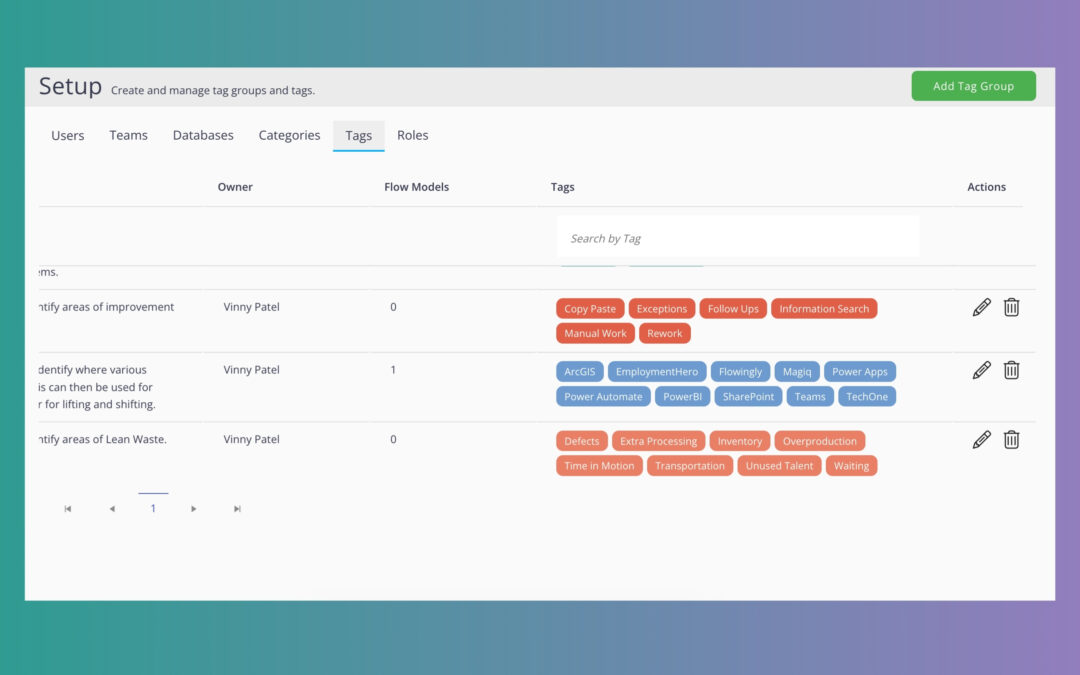
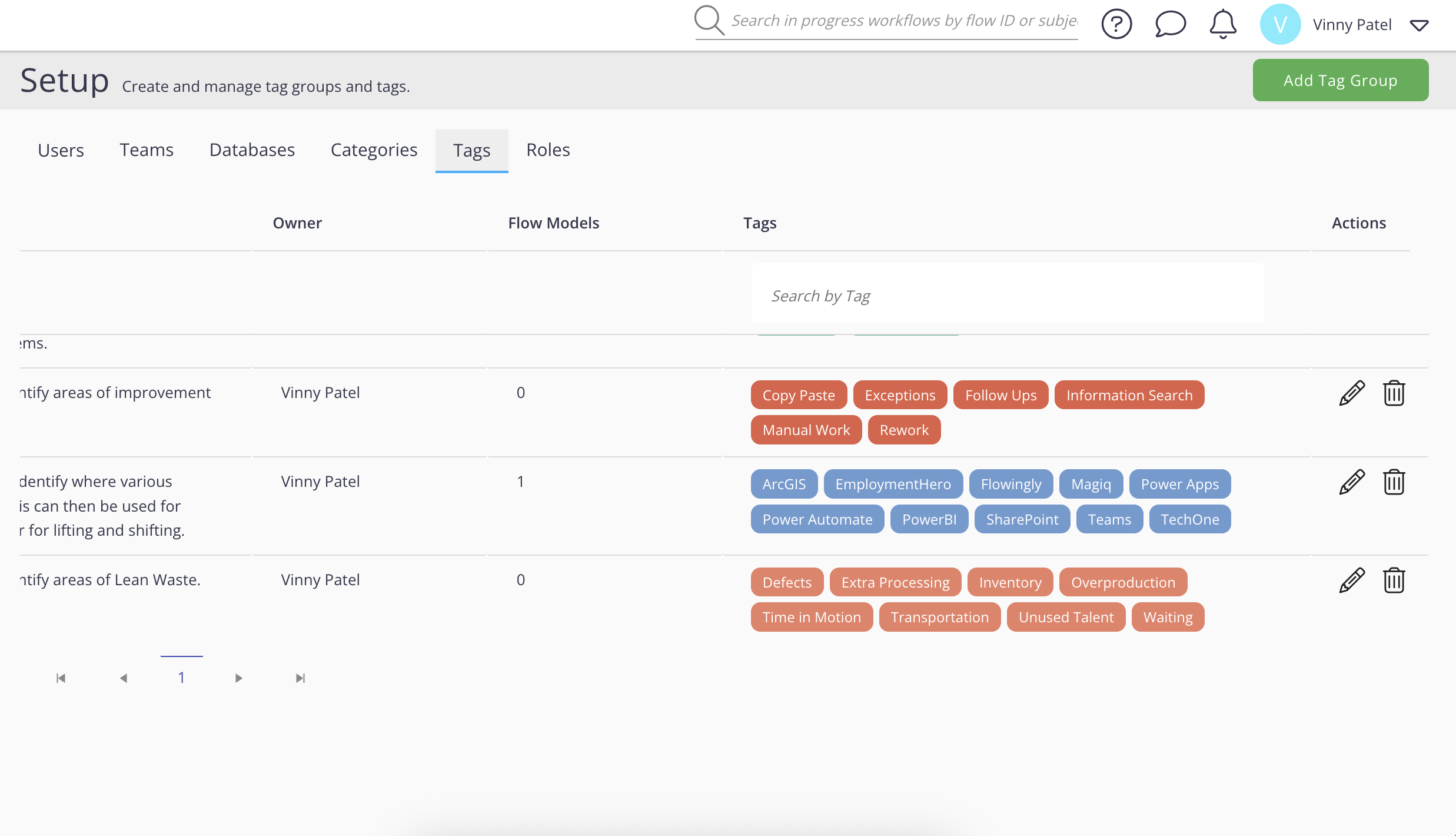
That’s why we’ve rolled out Process Improvement Tagging – your new easy way to capture, prioritise, and act on those improvement ideas.

How it works

Whether you’re mapping a process, building a workflow, or reviewing an SOP, you can now tag:

  • Specific steps that need improving (think “why are we still doing this by hand?”).

  • Whole processes that are ripe for automation.

  • Workflows that could be supercharged with AI.

From there, Flowingly automatically rolls those tags into roadmaps for process improvement, automation, or AI augmentation – so instead of a random list in someone’s notebook, you’ve got a clear, actionable plan.

Why it’s a game changer

Traditionally, process improvement is either:

  • A massive Lean/Six Sigma project that takes months, or
  • A bunch of good ideas lost in inboxes and sticky notes.

With Process Improvement Tagging, improvement becomes part of the everyday. Your team can:
✅ Spot and log opportunities in seconds.
⚡ Build automation and AI roadmaps without extra tools.
📊 Report on improvement ideas across all SOPs, workflows, and maps.

It’s simple. It’s built into Flowingly. And it means no more “we’ll fix it someday” excuses.

Ready to turn everyday ideas into real improvements?

Get in touch with our team at Flowingly to see how Process Improvement Tagging can make continuous improvement part of your daily workflow. We’ll show you how to capture opportunities, build improvement roadmaps, and get them implemented — without drowning in meetings or sticky notes.

Flowingly Product Update – Governance

Flowingly Product Update – Governance

Flowingly Product Update – Governance

Let’s be honest, process improvement often feels like trying to get a building consent approved during council Christmas break.
Slow. Painful. And by the time it’s signed off, you’ve forgotten what the problem was in the first place.

Our new Governance module changes that.

Now, anyone in your org can spot a problem, fix the map, or suggest a workflow improvement – without it vanishing into a black hole.
Here’s how it works:

  • You spot the issue. Maybe your SOP has a step that makes no sense. Maybe you’ve found a way to shave two days off a request process.

  • You make the change. Draft it up in Flowingly — no developer, no begging IT for a timeslot.

  • Governance kicks in. Your update automatically goes to the process owner for review and publishing. Oversight stays intact.

  • Everyone wins. Good ideas go live faster. Bad ideas get caught early. You build a culture where fixing things is normal.

Why it matters:
Traditionally, process improvement is top-down and slow. Governance flips it on its head – improvement starts at the edges (where the work actually happens), while governance stays tight at the core.

That means:
Faster changes without cutting corners
🛡 Compliance and audit trails built in
💡 More people improving processes – not just the chosen few

It’s like giving your team the keys to improve their own work… but keeping the speed limits in place.

If your council or team is ready to ditch the bottlenecks and get more brains in the game, Governance is live and ready to roll.

Ready to transform how your organisation works?

Get in touch with our team at Flowingly to see how Governance can unlock faster, safer process improvement. We’ll walk you through how your specific processes can be enhanced, cutting bottlenecks and keeping control where it matters.

How to Get Buy-In for Process Management Tools in Local Government 

How to Get Buy-In for Process Management Tools in Local Government 

How to Get Buy-In for Process Management Tools in Local Government 

Convincing your council or local government team to try something new? It can feel like wrangling a committee to agree on Friday’s lunch order – everyone has an opinion and there’s always a budget to watch.

But when it comes to adopting process management tools like Flowingly, a little extra effort upfront can lead to less admin pain, fewer headaches, and happier communities on the other side. 

Let’s dive into some simple ways you can inspire your council leaders, department heads, and colleagues to get excited about better ways of working.

Why should councils care about process management tools? 

Local government teams have a lot to juggle: community grants, building approvals, service requests, compliance… You name it. Where things get sticky is keeping track of all those moving parts, especially when you’re slogging through spreadsheets or chasing emails across departments. 

Enter process management tools. They take the chaos out of your daily grind, letting you automate the dull jobs (think: approval workflows, status tracking) and focus more on work that really helps your community. Not only does that mean faster response times and better compliance, it’s also less stress for everyone involved. 

But how do you get everyone on board? Start here.

1. Zero in on your team’s real pain points 

Instead of bombarding folks with features and sales pitches, begin with what actually causes friction in your workflows. Does reporting feel endless? Are community requests slipping through the cracks? Are you stuck in a never-ending email loop for approvals? 

For example: 

  • A rural New Zealand council might see grant applications sitting in limbo for weeks on end.
  • An Australian metro council could lose hours consolidating compliance data for state audits. 

Pointing out these everyday pain points helps people see that process management tools aren’t just ‘nice to have’ – they’re a practical fix for the stuff that keeps you up at night.

2. Show the money (and the time, and the peace of mind) 

Let’s face it: council budgets are tight and everyone wants to know, “What do we actually get out of this investment?” 

Be specific: 

  • Show how moving from paper or spreadsheet-driven workflows to digital can save staff hours (and the grey hairs that go with them). 
  • Share real numbers. “Automating building consent approvals could save 200 hours a month. That’s whole weeks’ worth of staff time, ready to put toward new projects.” 

The more you can point to actual hours, dollars, or improved service measures, the more convincing your case will be.

3. Share stories from similar councils

People trust stories from peers way more than flashy marketing stats. Do some digging: Has another council in NZ or Australia already taken the plunge with workflow automation? What changed for them? 

Huon Valley Council in Australia halved the time it took to onboard new staff by digitising their core processes. Otorohanga District Council in New Zealand found regulators breathing easier knowing LGOIMA requests were now processed in just five days instead of 20.

Even small wins at similar councils can help tip the scales.

4. Tackle concerns with a human touch 

No one likes it when something new crashes into their daily routine – especially if it means learning yet another system. Address this early by being upfront and empathetic. 

Acknowledge the learning curve. Share how Flowingly (or your chosen tool) is designed to be easy for everyone, not just tech whizzes. Offer hands-on training, and let folks know there’s support around the corner if they get stuck. 

Frame it as a helping hand: fewer manual tasks and a clearer view of what needs doing. Not a “replace the team” scenario, just a better way to get the jobs done. 

5. Highlight the wins for you and the community

At the end of the day, local government exists to serve the community. Always circle back to how these tools help customers: faster permit turnaround, fewer mistakes, clearer communication. 

But don’t forget to remind your team what’s in it for them – less busywork, an easier time meeting compliance, and more bandwidth for projects that spark pride. 

For example: “Imagine if residents could lodge a service request online and check the status anytime, no calls needed, no chasing for updates. Or if your finance team could sail through audit prep instead of drowning under paperwork.”

6. Make buy-in a team sport 

Don’t do all the heavy lifting yourself. Get enthusiastic peers involved and encourage champions across departments. Run short workshops to brainstorm process pain points, and be sure to celebrate (even the small) wins together. 

When people see colleagues getting excited about improvements, rather than just ‘management’ pushing change – it’s much easier to get them on board. 

When you speak your team’s language, focus on real problems, and bring a bit of humanity to the conversation, moving to better, smarter workflows isn’t just possible – it’s inevitable.

And as councils across New Zealand and Australia are starting to discover, these changes really do help teams deliver more for the people they serve. 


Why Offboarding Is the Most Important Process You’re Probably Not Automating

Why Offboarding Is the Most Important Process You’re Probably Not Automating

Why Offboarding Is the Most Important Process You’re Probably Not Automating

If onboarding is your council’s welcome mat, offboarding is the emergency exit – and it better work in a fire.

That was the big takeaway from our recent Flow & Tell session with Bay of Plenty Regional Council, where Senior Business Analyst Gill walked us through how they transformed their outdated leavers process into one of their most efficient, most visible, and most-loved workflows.

What started as a clunky, eight-year-old process sitting in Objective is now one of the most-loved workflows at the council – complete with automated handovers, built-in visibility, and zero manual emails.

So why should your council automate employee offboarding? Here are four reasons to make it your next automation project.

1. Offboarding is a compliance minefield

Offboarding is packed with compliance and security responsibilities. If a step gets skipped – like revoking system access, it opens the door to unnecessary costs and data risk. For many councils, there’s no single source of truth for tracking where the process is at or what’s been done.

By automating the offboarding workflow, councils can ensure that nothing gets missed. Built-in task assignment, visibility, and escalation paths mean every box is ticked, even if someone’s on leave or working remotely.

2. It’s prime real estate for automation wins

At Bay of Plenty Regional Council, the team rebuilt their leavers workflow in just a few days using Flowingly. Most of that time wasn’t spent building – it was spent aligning with stakeholders and updating the content. Once live, the process eliminated a heap of manual tasks, especially around email creation and follow-ups.

Pre-configured emails now go out automatically. Staff no longer have to copy-paste template text from Outlook or remember to send internal notifications. Everything flows in the background, triggered by a single form submission.

3. Visibility = less risk, less stress

One of the most frustrating parts of offboarding is the follow-up. HR teams end up chasing ICT for updates, reminding team leaders about final dates, or nudging people who’ve forgotten to complete their steps.

With automated nudges and status visibility built into the Flowingly dashboard, HR can now keep things moving without awkward follow-ups. Delegations are easy to apply, tasks can be reassigned instantly, and no one’s wondering, “Has that laptop been returned yet?”

4. You don’t need to be a tech wizard

The kicker? BOPRC’s team didn’t need developers or a giant IT project to get this done. They used Flowingly’s drag-and-drop builder, updated the workflow themselves, and can tweak it any time without calling in the cavalry.

That’s the kind of no-code empowerment councils need – especially with shrinking budgets and growing audit pressure.

👋 TL;DR: Offboarding isn’t just paperwork. It’s a critical, high-risk process that deserves automation love. If Bay of Plenty can turn it from bottleneck to breeze, you can too.

Need help getting started? Steal their offboarding workflow from our Process Hub or watch the Flow & Tell session where Gill walks through it here.